Showing posts with label Elin Mods. Show all posts

Wednesday, 14 May 2014

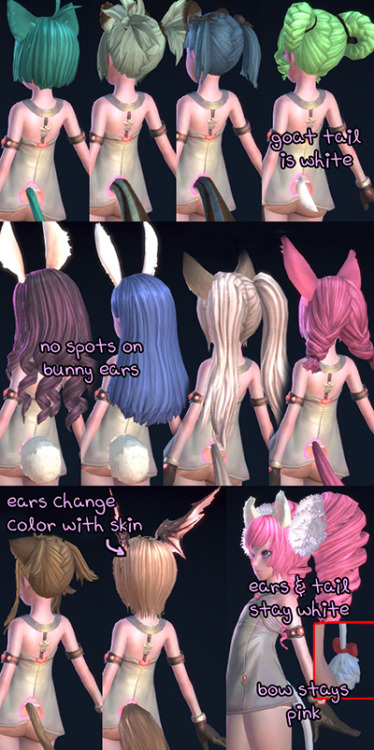
Elin Ears and Tails Colour Mod - Reaper Edition!

Allows the ears and tails of Elin to match the hair colour you chose.


All you see here and more in the Basic package.


The Special package contains all of the above, but with some extra changes to the new Reaper styles seen below.

SPECIAL: Puffballs removed, and tail ribbon is changed to black, so it matches everything.
(Note that there is a tiny hole in her hair, but not too noticeable.)

SPECIAL: Headwings have a special texture that changes with your skintone.
Installation:

Drag & Drop the included 'Client' folder into your TERA installation directory. You'll know you're in the right place when you see another 'Client' folder too. It's okay to merge the folders, as this mod will not overwrite any of your files. No need to worry about backing up! It simply adds it to a new directory entirely, and your game will read it, leaving your original safe and unharmed. 

Uninstallation:

You only need to go to 'TERA\Client\S1Game\CookedPC\Art_Data\_Packages\CH\PC', and delete the Popori_F_Head.gpk should you want to uninstall.

Help! Head 01 and Face 01 are missing in character creation!
Don't panic, this is normal, and only happens in character creation. You won't experience it anywhere in game. This happens because head 01 and hair 01 use test textures in CC, but use their normal ones in game.

Monday, 5 May 2014

Dyeable Maid with Dyeable Shoes

A simple mod that allows the shoes to colour with the dress, instead of black mary janes.

Rida
Only works for the dyeable Rida so far. Requested by mafurakodream

Installation:

Drag & Drop the included 'Client' folder into your TERA installation directory. You'll know you're in the right place when you see another 'Client' folder too. It's okay to merge the folders, as this mod will not overwrite any of your files. No need to worry about backing up! It simply adds it to a new directory entirely, and your game will read it, leaving your original safe and unharmed. 

Uninstallation:

You only need to go to 'TERA\Client\S1Game\CookedPC\Art_Data\_Packages\CH\PC', and delete the PC_Event_02.gpk should you want to uninstall.

Sunday, 30 March 2014

Candycorn Cutie + No Tail Devilicious

Removes the tail from Devilicious, and reskins the Bewitching Outfits.

The cheap looking dollar store tail is removed from all Devilicious outfits, and the non-dyeable one (Pictured on the right) now has red colouration instead of magenta.

Dyeable Bewitching now has striped pantsu that colour with your hair, as well as the beads and the squigglies on the bow. The regular one is a little more colourful in an attempt to match the flamboyant hat. Also, I have a candycorn fetish.


Installation:

Drag & Drop the included 'Client' folder into your TERA installation directory. You'll know you're in the right place when you see another 'Client' folder too. It's okay to merge the folders, as this mod will not overwrite any of your files. No need to worry about backing up! It simply adds it to a new directory entirely, and your game will read it, leaving your original safe and unharmed. 

Uninstallation:

You only need to go to 'TERA\Client\S1Game\CookedPC\Art_Data\_Packages\CH\PC', and delete the PC_Event_16.gpk should you want to uninstall.

Tuesday, 18 March 2014

Running Togs: Cheeks Edition

Makes the Running Togs for Elin into an outfit that resembles that of the storage pet "Cheeks".

Blue Running Togs

I absolutely adore this pet. He's looks like he's ready for an adventure. Just like my boy adventurer elin. As such, there aren't a whole lot costumes for him when you're not interested in cross-dressing.
I've included straps for the backpack, and a subsequent mod for the Popo Backpack will be made eventually.

Volleyball Uniform

Red Running Togs
This is only for elin, but if there becomes a demand for it, I might do it for other races.

Installation:

Drag & Drop the included 'Client' folder into your TERA installation directory. You'll know you're in the right place when you see another 'Client' folder too. It's okay to merge the folders, as this mod will not overwrite any of your files. No need to worry about backing up! It simply adds it to a new directory entirely, and your game will read it, leaving your original safe and unharmed. 

Uninstallation:

You only need to go to 'TERA\Client\S1Game\CookedPC\Art_Data\_Packages\CH\PC', and delete the PC_Event_03.gpk should you want to uninstall.

Elin Ears and Tails with Reaper

See this post! 

Monday, 10 December 2012

Elin Swimsuit Mod - Lamenting Pearl

So, this is my first mod. Released it about a week ago. It's a fancy retexture of the Elin Ruffled Swimsuit. They come in pink, blue, and yellow respectively. Yes, it works with both NA and EU versions.

Additional gallery of screenshots from other users below.


Installation:

1. IGNORE THE INSTRUCTIONS IN THE README.

2. Go to your TERA installation, and locate your TERA\Client\S1Game\CookedPC\Art_Data folder.
Do you see both Packages and _Packages folders? Y/N
YES: Proceed to CH - > PC
NO: you should create a series of folders, and place your mod in something that looks like this:
Client\S1Game\CookedPC\Art_Data\_Packages\CH\PC
3. Place the PCEvent.gpk (From the Download below) in TERA\Client\S1Game\CookedPC\Art_Data\_Packages\CH\PC.